
Interplay
Minecraft
Minecraft Vanilla
A standard gameplay experience featuring Playsquad's interplay effects.
Singleplayer
Multiplayer
Chat Integration
⛏️ Welcome to Minecraft Vanilla!
The classic Minecraft survival experience, enhanced with chatting interplays.
There are no set objectives. Explore the blocky world however you like!
Viewers can support the streamer—or make things more challenging—through donation interplays.
Some interplay effects are also linked to common chat, allowing everyone watching to participate together.
🔧 Getting Operator (OP) Permissions
Singleplayer
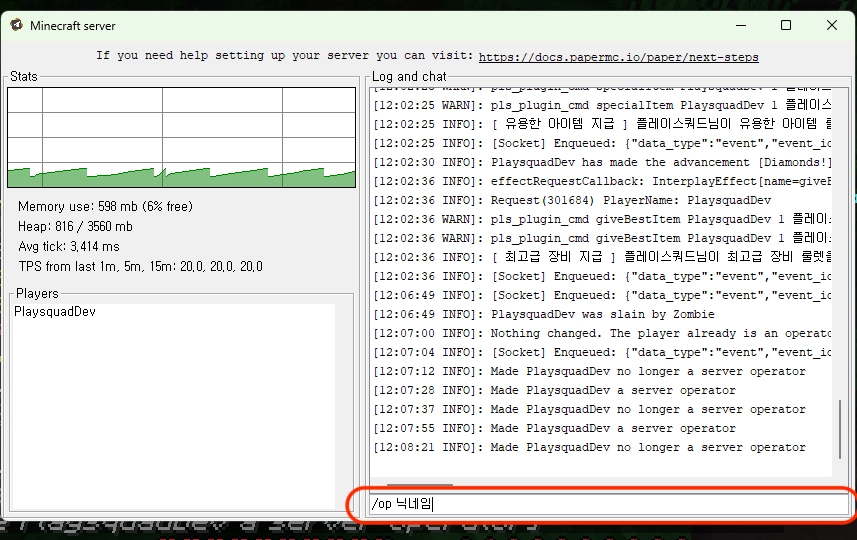
- When you start the game, the server console will launch automatically.
- To grant yourself OP (operator) permissions, enter the following command into the server console:
/op <MinecraftUsername> - To remove OP permissions, use:
/deop <MinecraftUsername> - Once you have granted yourself OP permissions through the server console, you can run commands directly from the in-game chat (press T) instead of using the console.
Multiplayer
- To grant yourself OP (operator) permissions, enter the following command into the server console:
/opuser <MinecraftUsername> - To remove OP permissions, use:
/deop <MinecraftUsername>
💡 Miscellaneous
- This content supports both Singleplayer and Multiplayer, each running in a different environment.
- In Singleplayer, the game runs on a local Minecraft server hosted on the streamer's PC, allowing the streamer to customize and modify the content more freely.
- In Multiplayer, the game runs on a remote server, just like most other Minecraft multiplayer content.
- 🎤 Setting Up In-Game Voice Chat
- ⚙️ Installing Custom Mods & Resource Packs
- ✏️ Creating Your Own Custom Interplay Effects