
Interplay
Minecraft
OneBlock
Expected Playtime : 4 hrs
From a Single Block, an Endless World
Singleplayer
Multiplayer
☁️ Welcome to OneBlock!
OneBlock is a Minecraft content where everything begins with a single block suspended high in the sky.
Gather resources from the endlessly regenerating OneBlock, then build, expand, and survive on your very own island.
📌 Overview
- Every time you mine the OneBlock, its level increases, unlocking new types of blocks and resources.
- Once the block reaches Level 100, you'll be able to open the End Portal and challenge the Ender Dragon.
- Mining the OneBlock also has a chance to spawn passive animals, loot chests, or hostile monsters.
- In Multiplayer, each player starts 20 blocks apart from one another.
🧭 Menu
- You can open the menu by entering the
/menucommand in the chat.
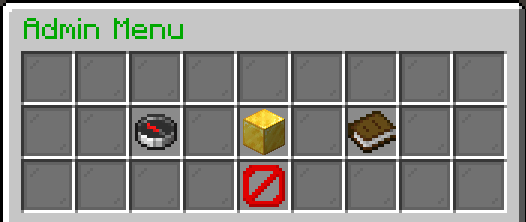
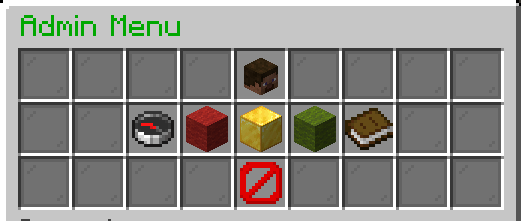
Functions
Check Player Levels
- You can view the OneBlock progress of every player participating in the game.
OP Permission
- Receive OP permission, and get access to server management settings.
Decrease/Increase Multiplier
- Click the red wool block to decrease the multiplier, or the green wool block to increase it.
- Higher multipliers increase the number of blocks that must be mined to level up, making the game more challenging.
- Example: If the multiplier is set to 0.5×, only half as many blocks need to be mined to reach the next level.
Enable Level Penalty Mode
- When Level Penalty Mode is enabled, your inventory is always protected, so you won't lose your items when you die.
- Instead of protecting your inventory, the Inventory Save Ticket protects your OneBlock level.
- Without this protection, dying will reduce your OneBlock level as a penalty.
💡 Miscellaneous
For more information please visit the pages below!